DS-160 Confirmation Page: What It Looks Like, How to Print
What the DS-160 confirmation page looks like and what is on it, how to print it when you submit, how to reprint it from CEAC with your Application ID, and what to do if you can't.
Last reviewed: November 23, 2026.
The DS-160 confirmation page is the one-page barcode page CEAC shows as soon as you submit your DS-160. Print it and bring it to your visa interview: it is the only part of the DS-160 you need to bring. If you have lost it, you can print it again from the official site with your Application ID.
What the confirmation page looks like
It is a single page, headed “Online Nonimmigrant Visa Application (DS-160) Confirmation”, under the line “This confirms the submission of the Nonimmigrant visa application for:”.
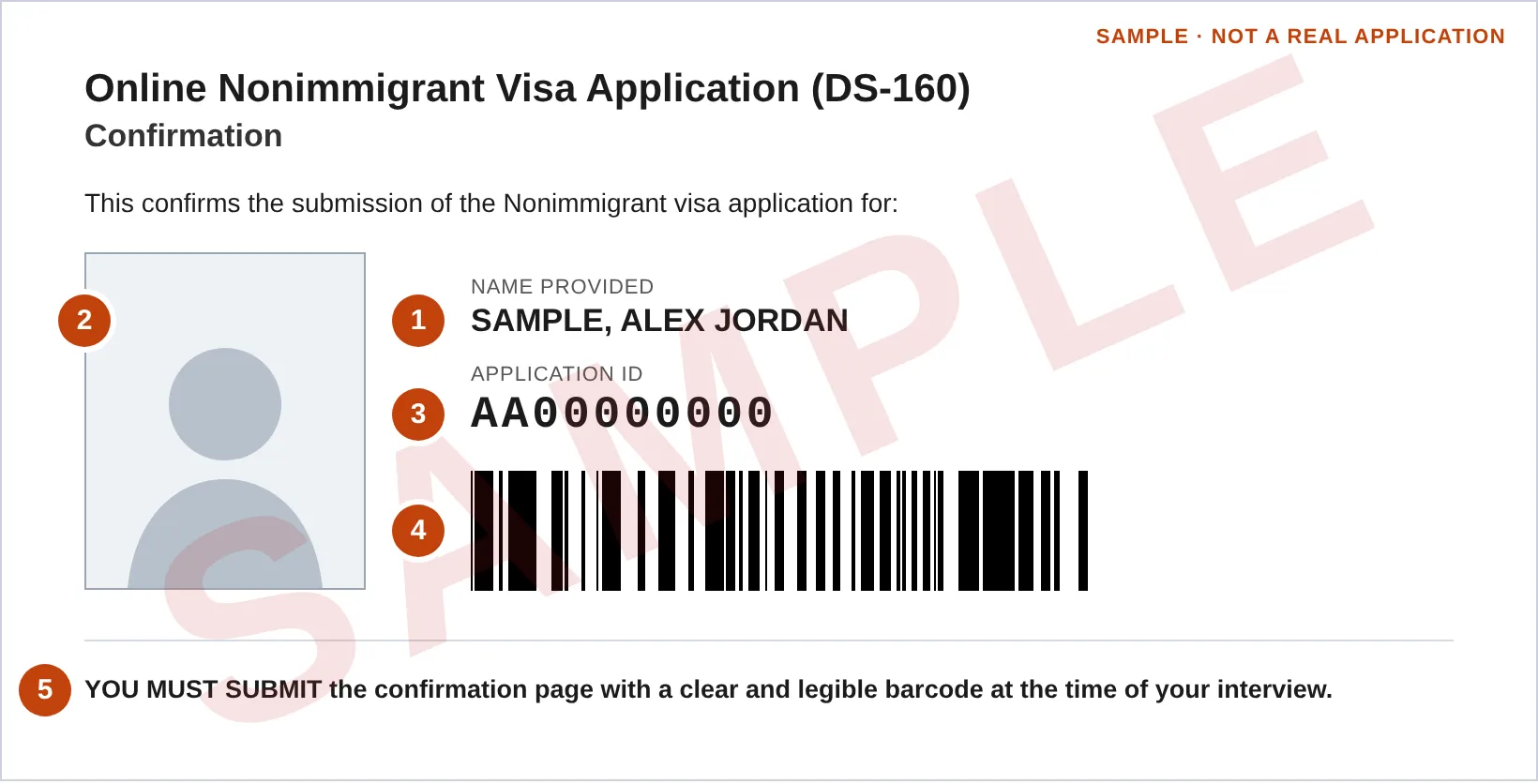
A simplified sample for a made-up applicant. Your own page comes from CEAC.
- Your name, as you entered it.
- The photo you uploaded.
- The Application ID, the 10-character code starting with “AA”, which embassies also call the confirmation number.
- A barcode of that number, which the consular section scans.
- A warning in capitals: “YOU MUST SUBMIT the confirmation page with a clear and legible barcode at the time of your interview.”
If your page has no barcode or no Application ID, it is not the confirmation page: you may have printed an earlier page, or the DS-160 was not submitted. Retrieve it on CEAC to check.
The confirmation page is not your DS-160
People often bring the confirmation page thinking it is the whole form. It isn’t:
| Confirmation page | Your DS-160 answers | |
|---|---|---|
| What it is | One page: who you are and which DS-160 you submitted | Every answer you gave, section by section |
| Bring it to the interview | Yes | No |
| Can you print it after submitting | Yes, from CEAC at any time | Not from CEAC: only before you submit |
The State Department’s DS-160 FAQ answers “Should I bring my entire application or just the confirmation page with me to the interview?”: “You are not required to bring your entire application.” To read your answers again, see our guide to seeing the answers on a DS-160 you already submitted, or the ways to get a PDF of your DS-160.
How to print it when you submit
The confirmation page appears straight after you sign and submit.
- Print it, or save it as a PDF from your browser’s print dialog.
- Check that the barcode came out sharp and complete: the consular section scans it.
- Email the PDF to yourself, so you have it if the printout goes missing.
Don’t close the page until you have a copy. If you do, you can still reprint it.
How to reprint it
On the official DS-160 site, ceac.state.gov/genniv:
- Select the location you chose when you started the DS-160.
- Choose Retrieve an Application.
- Enter the Application ID.
- Enter the first five letters of your surname, your year of birth and the answer to your security question, exactly as you set them.
CEAC then shows the confirmation page again, to print or save as a PDF.
If the site says the application “has been archived”, that is normal for a DS-160 submitted more than about a month ago. It “will take approximately 15 minutes to retrieve”: wait and try again.
Why you need it
Bring the confirmation page to your interview. The State Department’s DS-160 FAQ warns: “Without the confirmation page, we may not be able to process your visa case.”
The number on it also has to match the DS-160 number on your visa appointment. If you submitted a new DS-160 since you booked, update the appointment: see our guide to changing the DS-160 number on your appointment.
If you can’t reprint it
- You lost the Application ID. Look in your email, your appointment account and anywhere you saved the page. Our lost application ID guide lists the usual places.
- You forgot the security answer. There is no reset. You need a new DS-160, and then the new number goes on your appointment.
Keep a copy
- Save the confirmation page as a PDF and email it to yourself the day you submit.
- Keep the Application ID and your security answer somewhere other than the computer you used.
- If you want your answers too, save them before you submit, or read them back afterwards with the free Retrieve tool. It gives you your answers, not the confirmation page, which only CEAC prints.
Common questions
How do I get my DS-160 confirmation page? CEAC shows it when you submit. To get it again later, choose Retrieve an Application on ceac.state.gov/genniv and enter your Application ID and security answer.
Is the confirmation number the same as the Application ID? Yes. It is the “AA” code on the page, next to the barcode.
Does the confirmation page show my answers? No. It shows who you are and which DS-160 you submitted, not what you said in it.
Is it the same as my appointment confirmation? No. The appointment confirmation comes from the site where you booked your interview. The DS-160 confirmation page comes from CEAC. Bring both if your embassy asks for both.
Do I need to bring my answers to the interview? The confirmation page is what you bring. Reading your answers beforehand helps you answer the officer consistently with what you submitted.
This article is general information from official U.S. government sources, not legal advice. Your embassy or consulate decides your case.
Finish your DS-160 the easier way.
Answer the questions once. We check for missing and invalid answers, then enter everything on the official U.S. government website for you.
Free, with no card needed